Haunt Motion Texture: Add Cinematic Energy to Your Designs
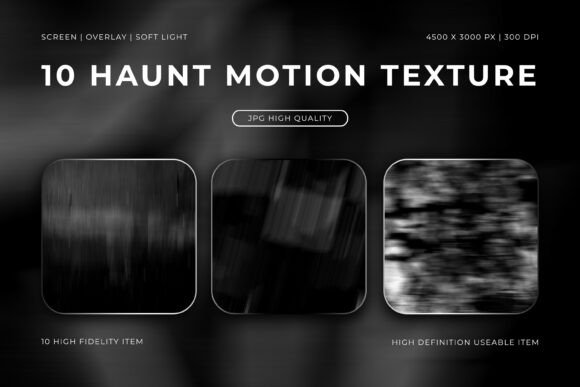
Every designer hits a point where a static background feels flat. You need something that moves, even in a still image. That’s the core idea behind Haunt Motion Texture—a set of abstract, motion-blurred assets that inject a sense of cinematic drama and visual momentum into any project. These aren’t your typical subtle grunge textures. They feature haunting streaks and ghostly gradients, creating an atmosphere that’s both mysterious and dynamic. Think of them as the visual equivalent of a slow shutter speed capturing a fleeting, eerie moment.
The personality of this texture pack is unmistakably moody and sophisticated. It’s not loud or chaotic, but rather controlled energy. The blurred lines suggest motion, depth, and a story unfolding just out of frame. This style resonates with projects that aim for a premium, high-fidelity feel. Whether you’re working on a poster for an indie film, a backdrop for a product launch, or an overlay for a music video, Haunt Motion Texture provides that elusive “something extra” that elevates good design to great.
Where Motion-Blurred Textures Shine
The versatility of these high-resolution JPG files (4500x3000 px at 300 DPI) is a major strength. Because they’re optimized for screen, overlay, and soft light blending modes, they integrate seamlessly into most graphic design and video editing software. Here’s where they find their most natural home:
- Digital Art & Photo Editing: Use them as overlays in Photoshop or Affinity Photo to add a gritty, atmospheric layer to portraits or landscapes. Set the blending mode to "Soft Light" or "Overlay" to let the underlying image show through while gaining that motion-streak effect.
- Poster & Editorial Design: For magazine covers, book jackets, or event posters, a full-bleed Haunt Motion Texture background instantly sets a cinematic tone. Pair it with a clean serif font or a modern sans serif font for high-contrast readability.
- Branding & Logo Design: While not a typeface itself, the texture can be applied to lettering or graphic marks in a logo design project to create a unique, textured identity. It’s particularly effective for brands in music, entertainment, or boutique fashion.
- Social Media Graphics & Motion Graphics: The inherent sense of movement makes these textures perfect for animated posts or video intros. They can serve as a compelling background for text reveals or transitions, adding visual energy that stops the scroll.
- Packaging Design: Imagine a matte black box for a luxury product with a subtle, streaked texture running along the edge. It communicates quality and intrigue before the product is even seen.
The key is to match the texture’s mood with your project’s goals. It’s not the right choice for a cheerful, playful children’s brand, but it’s perfect for anything that needs a touch of mystery, professionalism, or artistic depth.
Making Textures Work for Your Brand
Integrating a design asset like Haunt Motion Texture effectively goes beyond just slapping it on a canvas. It influences your entire visual hierarchy and brand perception. A consistent use of such a texture across a campaign or brand identity can build recognition—it becomes part of your visual language. The moody, high-definition quality lends an air of seriousness and craftsmanship, which can boost how your audience perceives your professionalism.
From a practical standpoint, always test your font pairing against the texture. A highly detailed script font or handwritten font might get lost in the streaks. Instead, opt for typefaces with strong, simple forms. A bold display font or a geometric sans serif font will hold its own. The goal is to ensure your message remains readable; the texture should enhance, not overwhelm, your core content.
A Practical Guide to Implementation
Before you commit, consider these steps:
- Evaluate Fit: Does your project need visual energy and a cinematic atmosphere? If it’s for a formal report or a minimalist website, you might want to look elsewhere.
- Test Blending Modes: Don’t just use the texture at full opacity. Experiment with "Overlay," "Soft Light," and "Multiply" in your software to see how it interacts with your color palette and underlying layers.
- Focus on Composition: Use the directional streaks to guide the viewer’s eye. Align the motion blur with your text or key visual elements to create a cohesive flow.
- Check Licensing: The pack is listed as compatible with any software, but always confirm the license for your intended use, especially for commercial projects like client work or merchandise.
Ultimately, Haunt Motion Texture is a specialized tool in your design assets toolkit. It’s not a one-size-fits-all solution, but for the right project, it provides a unique, high-impact aesthetic that’s difficult to replicate with standard filters or free resources. It’s about adding that layer of intentional, professional polish that separates amateur work from standout creative output. When your project calls for movement, mystery, and a touch of the cinematic, these textures deliver exactly that.